
The Best AI Tools for Research and Writing: From Notes to a Finished Draft
AI tools for research and writing have entered a new phase. It is no longer enough for a chatbot to produce a polished paragraph or shorten a long text. Today, a strong tool is expected to do much more: find sources, organize material, separate useful information from noise, preserve context, and ultimately help turn rough notes into a serious first draft.
That matters because the hardest part of writing is rarely just the writing itself. A huge amount of time goes into collecting material, comparing sources, extracting the key points, and trying to shape all of that into a coherent flow. This is exactly where AI is becoming useful — not as a replacement for the writer, but as a working layer between chaos and structure.
That is why the real question is no longer “which AI writes best,” but “which AI supports the whole process best.” Some tools are better for web research, some for working with your own documents, some for structuring ideas, and others for refining the final text.

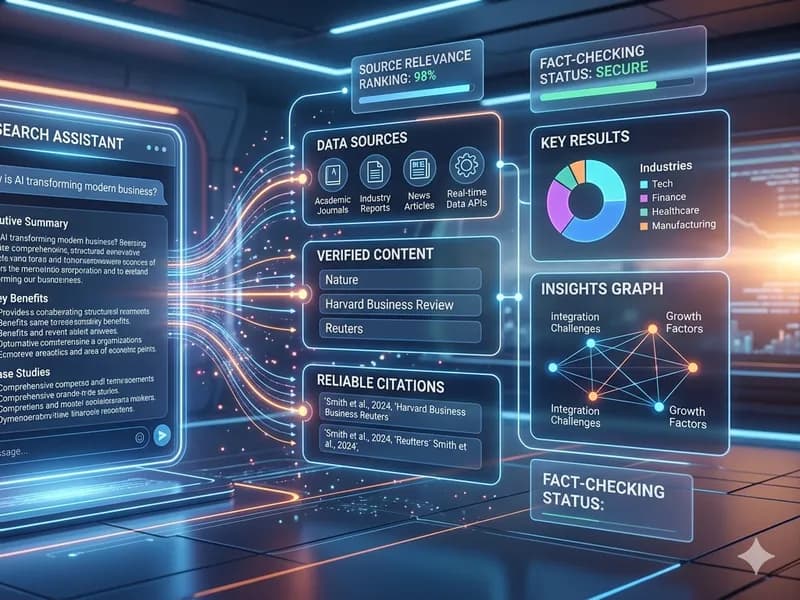
Visual illustration: InfoHelm
A good AI research tool is not measured only by the quality of its text
The biggest mistake is judging every tool by how impressive its response sounds in a single prompt. That is part of the experience, but for serious work it is often not the most important part. What matters much more is how the tool gets its information, whether it can work with your own sources, how well it preserves context, and how smoothly it lets you move from research to drafting.
In other words, a polished answer is not the same thing as a strong research workflow. A tool can sound convincing while handling sources poorly. On the other hand, some tools may seem less flashy at first, but are much more useful when you need to process multiple documents, extract key ideas, or keep an entire project in one place.
That is why AI tools for writing are increasingly starting to look like work platforms rather than simple chatbots.
ChatGPT and Claude are strong when research and drafting need to work together
When the goal is to move from an open question to a structured draft, the strongest impression comes from tools that combine research, organization, and iterative writing. ChatGPT and Claude stand out here.
Their advantage is not just that they can generate text, but that they increasingly function like working partners. They can help gather information, summarize material, create structure, reshape tone, and refine drafts through multiple steps. That makes them useful for writers who do not want just “one answer,” but an entire workflow from idea to usable first version.
In practice, these tools are most helpful when you already know what you want to write, but need help turning research into a clear narrative. In those situations, they are excellent for outlines, working headlines, paragraph restructuring, and condensing large sets of notes into a coherent framework.
NotebookLM follows a different logic, and that is exactly why it is useful
Unlike general-purpose chat tools, NotebookLM becomes especially interesting when you are working with your own sources. Its greatest strength is not “creative writing,” but the fact that it stays grounded in the materials you provide and builds the workflow around those sources.
That makes it especially useful for students, analysts, long-form writers, and anyone working with PDFs, notes, presentations, or internal documents. When you already have a pile of material and need to extract meaningful conclusions, this kind of approach often matters more than a general chat interface that jumps between topics.
In practice, NotebookLM may not be the strongest tool for final polish or elegant phrasing, but it is very strong where source organization and material comprehension matter most. That is why it often works best as a middle layer in the process: first organize and understand the material, and only then move to full drafting in another tool.
Gemini is strongest if you already live inside the Google ecosystem
Gemini becomes especially useful when research is part of a broader workflow inside Google’s environment. If you already write in Docs, store files in Drive, work with spreadsheets, and manage projects in Workspace, the advantage is not just the AI output itself, but the fact that the tool is close to where the work already happens.
For many users, that matters more than having the “smartest” model. Not everyone needs the most spectacular answer. Many people simply need a tool that can quickly assist with writing documents, improving drafts, extracting context from existing files, and speeding up everyday work without forcing them to jump across too many tabs.
That is why Gemini makes sense for users who want a practical writing assistant inside an existing workflow, rather than a separate research platform.
Perplexity is excellent for quickly mapping the terrain
When the goal is to enter a topic quickly, see what is being discussed right now, and get a source overview without much setup, Perplexity remains one of the most useful options. Its main strength is speed.
That makes it especially valuable in the early stage of a project: defining the topic, building an initial source map, checking terminology, getting a basic market overview, or identifying relevant articles before diving deeper. It may not be ideal as the central place for a full writing workflow, but it is highly effective as a first step.
Put simply, Perplexity often helps you move quickly from “I do not know where to start” to “now I know which directions are worth exploring.”
For the writing itself, specialized tools still have their place
Even though large AI assistants now do many things, specialized writing tools have not disappeared. Their role has simply changed. Instead of being the main “text generator,” they increasingly handle the final layer: tone, clarity, concision, grammar, rephrasing, and stylistic consistency.
That remains especially important in professional writing, where it is not enough for a text to be informative. It also has to be readable, polished, consistent in tone, and adapted to its audience. This is where tools like Grammarly and similar assistants still make sense, especially when the overall structure of the draft is already in place.
In other words, the best workflow is often not one tool, but a combination: one for research, another for source-based work, a third for drafting, and a fourth for final polish.
So which are the best AI tools for research and writing?
If we look at them by role in the workflow, the most logical breakdown looks like this:
For web research and initial topic mapping: Perplexity and ChatGPT.
For working with your own sources and notes: NotebookLM.
For longer workflows that move from research into draft: ChatGPT and Claude.
For users who live in Google Docs and Drive: Gemini.
For final language polishing and style refinement: specialized writing tools like Grammarly.
That does not mean there is one universally best choice for everyone. The right tool depends on whether you are starting from scratch, whether you already have your own sources, whether you work alone or in a team, and whether research, structure, or final tone matters most in your process.
Conclusion
AI tools for research and writing become most useful when we stop treating them like instant-text machines. Their real value lies in shortening the path from messy notes to a serious first draft.
That is why the goal today is no longer to find the tool that “writes the best,” but the one that best matches the way you work. For some, that will be a research-first tool. For others, it will be a document-first system. And for many, it will be a flexible assistant that connects several steps in one place.
At least for now, the best result usually does not come from one magical AI product, but from a smart combination of tools, each solving a different part of the job.
Note: This article is educational and informational.